Email Address at MENDELU
The University Information System (UIS) provides every user (i.e., all students, employees, external collaborators, etc. of Mendel University in Brno) with an email address that is used for various university purposes. The email address may have multiple forms depending on your requirements and your relationship with the university. You can view your email addresses in UIS at the following link: is.mendelu.cz/auth/ca/ucet.pl? (the table at the bottom contains all your email addresses and aliases). At the same time, every user is assigned an email address in the format UID@node.mendelu.cz, where UID is your user identification number. This mailbox remains available to the user in a limited capacity even after their active relationship with the university has ended (Note! Emails in this mailbox are stored for only one month). If users are entitled to Microsoft 365, their mailbox is created within the Microsoft 365 cloud service. Every user can verify their eligibility at the following link: is.mendelu.cz/auth/ca/ucet.pl? (if you are eligible, Microsoft 365 will appear in the table).
University Email Delivery
All email sent to MENDELU first arrives at a central location, from which it is distributed to the individual email solutions—there are four possible options (if the sender and recipient use the same email solution, the email is delivered directly). Throughout the following text and the individual guides, the term distribution server is used. The distribution server provides every user with access to all incoming email. It is therefore the designation used for the mail server that handles incoming email.
Each user can choose the distribution server that best suits their preferred email solution, taking into account usability, simplicity, additional applications, and available functionality. In general, we recommend using Microsoft 365.
You can change your distribution server in the University Email Delivery application within UIS. This application is used to configure a single distribution server for receiving all of the user's email, regardless of which email address it is sent to. The currently selected server is highlighted. Only the mail servers that the user is entitled to use are displayed, as shown in the image below.
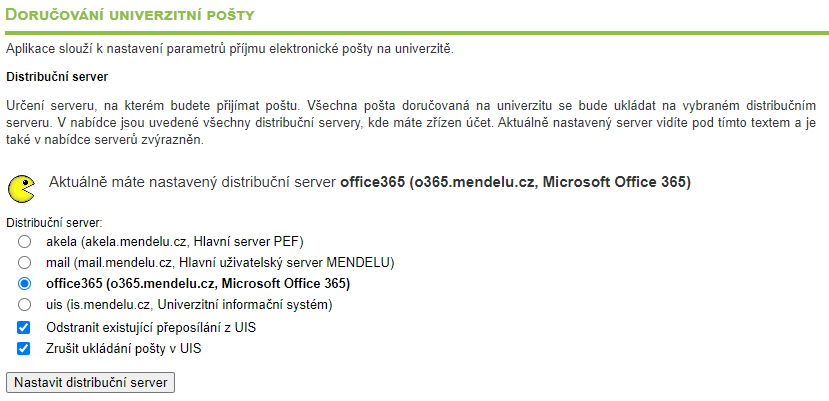
If the Remove existing forwarding from UIS option is selected, all email forwarding rules configured in the UIS mailbox will be removed. The Stop storing email in UIS option allows you to stop storing forwarded emails in your UIS mailbox. If the mailbox on the selected distribution server becomes full, the distribution server will automatically switch to the UIS server (the UIS web interface for reading email), which guarantees the delivery of system messages. A notification email informing you that forwarding to the original address has been cancelled will be sent to login@node.mendelu.cz.
Distribution Servers
On the following pages, you can find detailed information about the individual distribution servers, including their main features, advantages, and disadvantages. Any email forwarding rules you configure apply only to the distribution server where they were set up. If you are entitled to use a distribution server, you can sign in to it and send email from it.
Microsoft 365 (o365.mendelu.cz)
- The mailbox capacity depends on your assigned license. Licenses are assigned based on your overall use of the Microsoft 365 suite. In general, the available licenses are:
- A1 – 50 GB, license for employees
- A3 – 100 GB, license primarily for students or employees
- A5 – 100 GB, license for university management
- Integration with other Microsoft 365 services such as Calendar, Teams, OneDrive, etc.
- Create custom email processing rules and multiple email signatures.
- Available as a desktop application, web application, and mobile application (Outlook).
- Email forwarding is currently blocked.
- Remote access to email is also available through Thunderbird, which can automatically detect an Office 365 account, eliminating the need for manual configuration.
- If required, remote access can also be configured using POP3 and IMAP.
UIS (University Information System, is.mendelu.cz) - This email solution is no longer being developed and will be discontinued on September 30! See the announcement
- The mailbox capacity depends on your eligibility. In general, the capacities are:
- Employees – 800 MiB
- Students – 300 MiB
- External collaborators – 50 MiB
- Graduates – 10 MiB
- Access to the mailbox is available by signing in to the University Information System.
- The UIS user interface is not actively developed.
- Automatic messages from UIS are delivered to this distribution server the fastest.
- Remote access is not recommended.
- Email forwarding is automatically cancelled if forwarded messages cannot be delivered due to any error.
mail (Main local email solution, mail.mendelu.cz)
- The mailbox capacity depends on your eligibility. In general, the capacities are:
- Employees – 10 GiB
- Others – 1 GiB
- Maximum number of recipients per email: 30.
- Maximum number of unique recipients within 24 hours: 100.
- Mailbox access through the Roundcube web interface.
- Remote access through email clients (Thunderbird, Outlook, etc.) using manual configuration.
- We recommend using this distribution server if you require remote access through email clients such as Thunderbird.
- Available only to students and employees of the Faculty of Business and Economics
- The mailbox capacity depends on your eligibility. In general, the capacities are:
- Employees (Faculty of Business and Economics) – 4.77 GiB
- Employees (Institute of Informatics) – 9.54 GiB
- PhD students – 4.77 GiB
- Students – 2.84 GiB
- Users generally entitled to the Akela distribution server – 90.46 MiB
- Mailbox access through the Roundcube web interface.
- Remote access through email clients (Thunderbird, Outlook, etc.) using manual configuration.
Sending Email
When sending email to the Microsoft 365 distribution server or from the Microsoft 365 distribution server, the Microsoft 365 mail server is used directly. When sending email from any distribution server to a distribution server other than Microsoft 365, or in all other cases, the university mail server (smtp.mendelu.cz) is used.
The university mail server used for sending email has the following anti-spam limits configured:
- Sending a maximum of 60 messages within 60 seconds.
- A single sender may send to a maximum of 200 recipients within 60 seconds.